11. Visual walkthrough
A recorded tour of the interactive merged graph: communities first, then the two HTTP traces across the repo boundary.
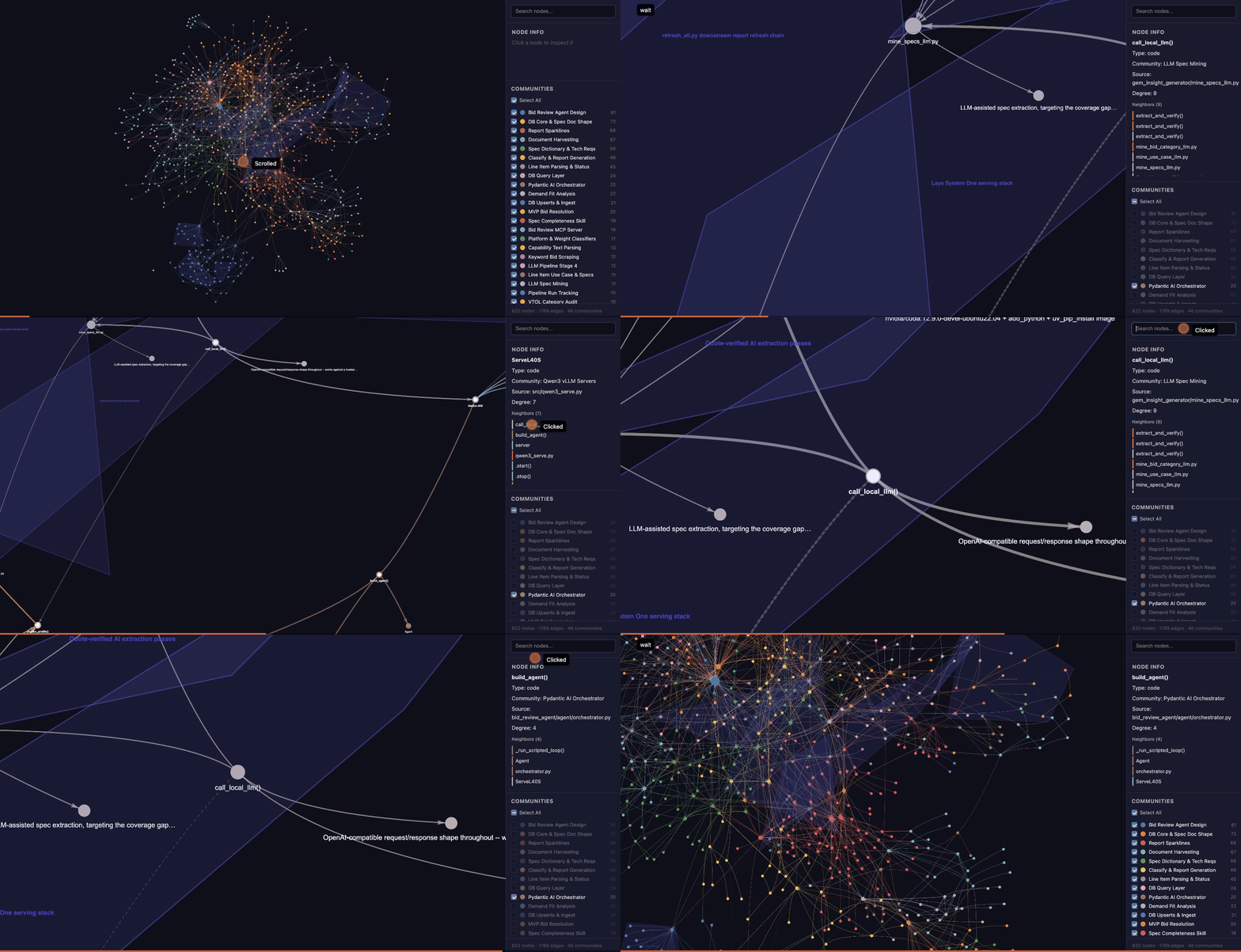
Open the interactive graph yourself
What you are seeing
| Step | Action in the graph | What it shows |
|---|---|---|
| 1 | Full graph, 832 nodes, 46 colour-coded communities | Two repos and their structure. Shaded hulls are hyperedges (groups of 3+ related nodes) |
| 2 | Untick Select All, then tick six communities: LLM Spec Mining, Capability Explanation Phrasing, Pydantic AI Orchestrator (repo A), Qwen3 vLLM Servers, GPU Serving Profiles, Modal Serving Concepts (repo B) | Only the communities on either side of the HTTP boundary |
| 3 | Focus call_local_llm() |
The shared batch LLM client. The info panel lists its 9 neighbours, including the three extract_and_verify() callers |
| 4 | Fit to call_local_llm(), build_agent(), phrase_profile(), ServeL40S |
The two manual calls_http edges converge on ServeL40S. Its neighbour list starts with call_local_llm() and build_agent() |
| 5 | Click call_local_llm() in the neighbour list |
Navigating the graph by following neighbour links |
| 6 | Search build_agent, open it |
The live agent's model client: 4 neighbours, one of them ServeL40S in the other repo |
| 7 | Select All again, fit | Back to the full picture. The two edges you just followed are the only links between the repos |
Try it yourself
- Community filter: untick Select All, then tick one or two communities to isolate a subsystem.
- Search: type part of a node name and click a result to focus it.
- Neighbour links: in Node info, click any neighbour to jump to it. This is the quickest way to trace a call chain by hand.
- Zoom for labels: labels appear as you zoom in. Every node has one, but graphify's default export hides labels on low-degree nodes (see Communities).
How the recording was made
The graph HTML was served locally (python3 -m http.server) and driven in Chrome. Community toggles and camera moves went through the page's own functions: toggleAllCommunities, the legend checkboxes, and network.focus / network.fit from vis-network. Search and neighbour clicks were real UI clicks. The frames were exported as a GIF.
// isolate the communities on each side of the HTTP boundary
document.getElementById('select-all-cb').click();
const keep = ['LLM Spec Mining', 'Pydantic AI Orchestrator', 'Qwen3 vLLM Servers' /* ... */];
document.querySelectorAll('.legend-item').forEach(li => {
  if (keep.includes(li.querySelector('.legend-label').textContent.trim()))
    li.querySelector('.legend-cb').click();
});

// frame the cross-repo trace
const ids = ['drone-okg::gem_insight_generator_mine_specs_llm_call_local_llm',
             'drone-okg::bid_review_agent_agent_orchestrator_build_agent',
             'modal_io_serve::src_qwen3_serve_servel40s'];
network.selectNodes(ids, true);
network.fit({ nodes: ids, animation: { duration: 1200 } });